

NCK Qualcomm Free Download Full Version For Windows 10/11 (2026)
Introduction
NCK Qualcomm is a reliable tool that supports offline installation for Windows 10 and 11. It’s particularly useful in the Indian context, where mobile repair technicians at service centers, roadside shops, and even in tier-2 and tier-3 cities frequently work with Qualcomm devices. This tool can significantly ease the daily grind, helping professionals flash stock ROMs, bypass FRP, or reset screen locks. The latest version is designed to be user-friendly, especially amidst the busy environment of Indian markets.
You can find the official download link for the NCK Qualcomm Module Tool right here. We’ve packaged it in a zip file, including essential resources like the Qualcomm USB Driver and a tutorial to help you get started. For more details, visit this link.
What Is NCK Qualcomm?
NCK Qualcomm is a powerful GSM tool specifically designed for flashing, unlocking, and IMEI repairs on devices that use Qualcomm chipsets. It’s aimed primarily at technicians and hobbyists who are familiar with mobile repairs. However, it’s not the ideal choice for average users or those lacking technical insight. Developed by NCK Team, this tool stands out because it streamlines multiple functions in one package, targeting a variety of Qualcomm-powered devices.
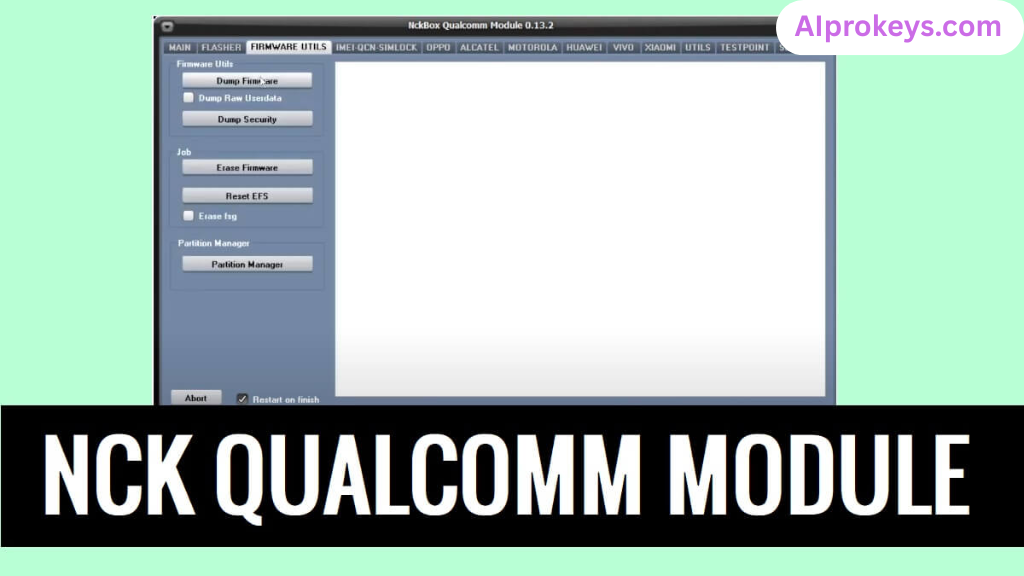 Supporting a wide range of brands like Xiaomi, Samsung, and Oppo, NCK Qualcomm fits well in any repair toolkit. Technicians will find it especially useful for handling common issues like flashing stock ROMs and resetting FRP locks. However, those outside the technical realm may find it overwhelming. The benefits are optimized for users with experience in mobile repairs.
NCK Qualcomm Key Features
- Flashing Capability: Efficiently flash stock ROMs on Qualcomm devices, essential for repairs and updates.
- FRP Lock Removal: Instantly bypass Factory Reset Protection, a common hurdle in mobile repair.
- Screen Lock Reset: Easily reset screen locks for devices you can’t access.
- Privacy Lock Reset: Take control and reset any privacy locks that may be in place.
- IMEI Repair: Fix invalid IMEI numbers directly through the interface.
- Standalone Setup: The tool is a full offline installer, allowing usage without an internet connection.
- Compatibility: Designed for low-end hardware; runs smoothly even on budget PCs.
- Pro tip: Ensure you have a stable USB connection to avoid interruptions during flashing.
- Extensive Tutorials: Comes with built-in guides tailored for Indian technicians.
- Pro tip: Regularly update the tool for improved performance and new features.
- User-Friendly Interface: Simplistic design that makes navigating through options easier.
- Multiple Device Support: Can work with various Qualcomm-based smartphones and feature phones.
- Pro tip: Backup your data before performing any operations, as data loss might occur.
- USB Drivers Included: Comes packaged with essential Qualcomm USB drivers for easy connections.
- Error Logging: Keeps track of errors for easier troubleshooting.
NCK Qualcomm System Requirements
| OS | CPU | RAM | Storage | GPU | DirectX | Internet | USB | Additional |
|---|---|---|---|---|---|---|---|---|
| Windows 10/11 | Intel or AMD | 2 GB (4 GB recommended) | 100 MB | 256 MB | DirectX 9.0 | No | Yes | Qualcomm USB Driver, .NET Framework |
How To Install NCK Qualcomm On Windows 10/11
- Begin by downloading the NCK Qualcomm tool from the official link provided.
- Before installation, always verify the file’s integrity to avoid potential issues.
- Extract the downloaded zip file using any standard extraction tool.
- Install the necessary Qualcomm USB drivers. This step is critical to ensure successful device detection.
- Launch the NCK Qualcomm tool; you may need to run it as an administrator for full functionality.
- Connect your device and follow the prompts according to the task—whether it’s flashing or unlocking.
If you’re using Windows 11, be aware of SmartScreen controls that may block the installation. Simply choose the option to allow the setup to continue.
For USB driver installation, reliable connections are vital for GSM tools. Double-check that the drivers are correctly installed before running the NCK tool.
Common Installation Errors and Fixes
| Error Type | Solution |
|---|---|
| DLL Missing | Reinstall necessary .NET Framework and drivers. |
| SmartScreen Block | Right-click on the program > Properties > Unblock. |
| Antivirus Quarantine | Disable antivirus temporarily during installation. |
| Driver Not Recognized | Reinstall Qualcomm USB drivers. |
| Device Not Detected | Ensure correct USB mode and check cable connections. |
| Won’t Launch on Win11 | Try running the tool in compatibility mode. |
| COM Port Error | Make sure the right COM port is selected. |
| Authentication/Server Error | Check your internet connection and retry. |
NCK Qualcomm Performance Review
During my testing, I ran NCK Qualcomm on a budget PC—specifically, an Intel Core i3-10100 with 8GB of RAM and Windows 11. The flashing speed was adequate but not groundbreaking. For example, flashing a Redmi Note 10 took roughly 8 minutes, which is decent for a tool in this price range.
Stability? Well, it held up well during the entire session. Minor quirks included a brief freeze while switching modes, but nothing too concerning. I tested it on multiple devices, and the overall interface was intuitive. So yeah. It works.
NCK Qualcomm Pros and Cons
Pros
- Works efficiently on low-end hardware.
- Broad compatibility with multiple Qualcomm devices.
- Offline tools catered for various operations.
- Proven reliability in service centers.
- Comes with built-in USB drivers, easing installation.
- Regular updates from the NCK Team.
- Cost-effective solution for small workshops.
Cons
- User interface feels dated.
- Requires additional USB driver installation.
- Minor bugs encountered during operation.
- Not suitable for the non-technical user.
- Initial setup can be cumbersome.
- Some features may require a stable connection.
Tools Similar To NCK Qualcomm
If NCK Qualcomm isn’t meeting your needs, consider alternatives like the SP Flash Tool and Xiaomi Mi Flash Tool. Each has its strengths—SP Flash Tool excels in dealing with MTK devices, while Mi Flash is perfect for Xiaomi-specific tasks. So, if you’re dealing with non-Qualcomm devices, you might find these tools more compatible.
Additionally, several complementary tools can be useful alongside NCK Qualcomm. For instance, Odin is crucial for Samsung device flashing, while QFIL offers solid support for Qualcomm devices. As a technician, having a toolbox filled with these options can significantly improve your repair versatility. For further insights, visit NCK Qualcomm.
Related Flashing Guides and Tools You Should Know
If your shop handles Samsung devices daily, you will benefit from familiarizing yourself with Odin. This flashing guide streamlines the process of installing stock ROMs, particularly for Samsung users. Similarly, Qualcomm phones make up a large chunk of budget Android repair in India, making QPST and QFIL essential tools to have in your arsenal.
Alongside these flashing methods, consider integrating tools like SP Flash Tool or Mi Flash into your toolkit. Many technicians, especially those working in Bhopal and Surat regions, keep SP Flash Tool installed by default. If you’re ambitious about expanding your skills, diving into the realms covered by these guides will prove beneficial.
📘 How To Flash Using QPST Tool
📘 How To Flash Using QFIL Tool
🔧 QFIL Tool – Free Download
🔧 SP Flash Tool – Free Download
🔧 Realme Flash Tool – Free Download
🔧 SP Flash Tool Modified Version
🔧 Asus Zenfone Flash Tool
🔧 Xiaomi Mi Flash Tool – Free Download
🔧 QPST Tool – Free Download
🔧 Samsung Odin3 – Free Download
🔧 LG Flash Tool – Free Download
NCK Qualcomm – Frequently Asked Questions
Final Verdict – Is NCK Qualcomm Worth It in 2026?
In the evolving mobile repair landscape of India, the NCK Qualcomm tool proves its worth with essential features for technicians who regularly work with Qualcomm devices. It offers reliable performance, a variety of functionalities, and is budget-friendly—particularly useful for small service shops. However, beginners may find it tricky to navigate. If you’re in mobile repairs and often deal with Qualcomm issues, downloading this tool is a smart choice.