

Download Internet Download Manager (IDM) 6.43 Build 1: Complete Guide for Indian Users in 2026
Internet Download Manager (IDM) is a Windows download accelerator that splits files into multiple parallel segments to max out your bandwidth and it is the single most effective way to make large downloads faster on any Indian ISP. If you are downloading ISO files, large videos, or bulk PDFs regularly, IDM cuts wait times by a measurable margin. If you are looking for a free crack, this guide will show you why that is the one thing worth avoiding.
What IDM Actually Does (and Why It Works)?
When your browser downloads a file, it opens one connection to the server and pulls the file sequentially. Internet Download Manager opens up to 8 parallel connections to the same server using its Dynamic File Segmentation technology. Each connection grabs a different slice of the file simultaneously, and if one connection speeds up or slows down, IDM rebalances the segments dynamically — it finds the largest remaining chunk and splits it between a free connection and an active one.
The result: IDM claims up to 8x faster downloads. In practice, the actual gain depends on your connection.
What this looks like on typical Indian connections:
- On a Jio Fiber 100 Mbps plan, most individual server connections are throttled by the host, not your ISP. IDM’s parallel connections bypass that per-connection cap, so you will often download at 70–90% of your subscribed speed rather than 20–30% with a single-threaded browser download.
- On a BSNL Broadband 40 Mbps line, IDM’s advantage is equally real — browser downloads on congested connections tend to drop out; IDM resumes automatically and holds the connection more reliably.
- On Airtel Xstream 200 Mbps, you will hit server-side limits more often than ISP-side limits, so IDM’s multi-segment approach still helps but the gains are less dramatic.
One important ceiling: Internet Download Manager (IDM) cannot exceed your actual internet plan’s maximum speed. If your plan caps at 50 Mbps, IDM downloads at 50 Mbps peak — but it will reach that ceiling more consistently than a browser.
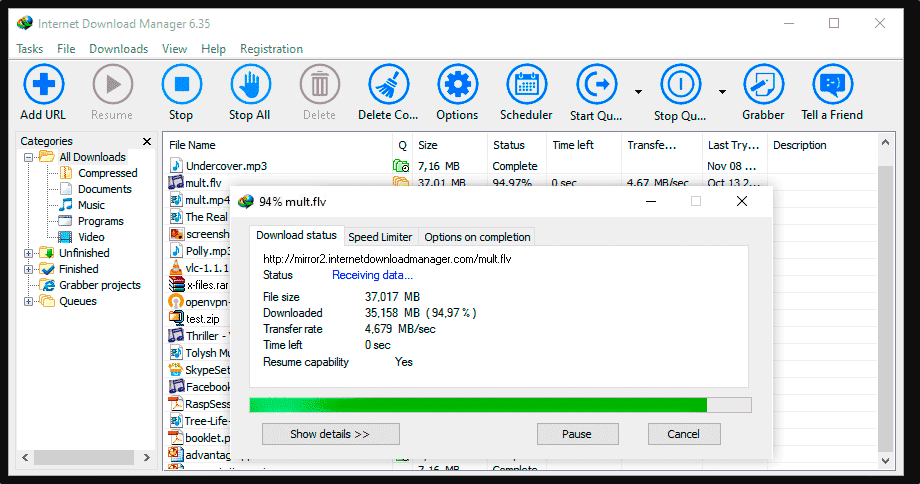
Key Features Worth Using:
- Browser integration is IDM’s most visible feature. Once installed, a download button appears on videos and a download dialog intercepts file links automatically in Chrome, Firefox, Edge, and Opera. For most users, this is the entire value proposition — you never think about it, it just works.
- Pause and resume works even after a system restart. Internet Download Manager (IDM) saves the partial download and resumes from exactly where it stopped, which matters when downloading multi-gigabyte files on unreliable connections.
- Download scheduler* lets you queue large downloads to run at off-peak hours — say, 2 AM when your JioFiber line is less congested. You can schedule individual files or entire queues.
- Video grabber detects streaming content across most video platforms and displays a floating download button. This works on sites beyond YouTube — educational platforms, regional streaming sites, and direct video embeds.
- Site grabber / batch downloader* lets you download all files of a specific type from a webpage in one go. Useful for bulk downloading documents from a university site or images from a gallery.
- Zip preview lets you see the contents of a ZIP archive before downloading it fully — you can choose specific files to extract without pulling the whole archive.
How to Install IDM and Set Up Browser Integration?
Step 1: Download from the official source:
Go to internetdownloadmanager.com and download the 30-day free trial. Do not download from any third-party mirror the installer files should be code-signed with a Microsoft certificate issued to Tonec Inc. If the installer you downloaded is not signed by Tonec Inc., delete it.
Step 2: Install Internet Download Manager (IDM)
Run the installer and follow the prompts. IDM will ask to integrate with your browsers during installation allow this. After installation, restart your browser.
Step 3: Set up Chrome integration (manual steps often needed)
Important: The Internet Download Manager (IDM) browser extension is not available in the Chrome Web Store. Every “IDM extension” you find by searching the Web Store is fake — do not install those. The genuine extension is installed automatically from IDM’s installation folder.
If the extension does not appear automatically after installation:
1. Open IDM → Options → General → check that “Use advanced browser integration” is enabled.
2. In Chrome, go to chrome://extensions and look for “IDM Integration Module.” If it appears but is disabled, enable it and grant permission to read data on all sites.
3. If it does not appear at all: close Chrome completely, reopen it, and check again. If still missing, reinstall IDM with Chrome closed.
For Firefox, install the official IDM Integration Module from the Firefox Add-ons page (search “IDM Integration Module” on addons.mozilla.org the one published by Tonec Inc.).
For Edge, IDM’s installer handles integration automatically. Enable the extension under Edge → Extensions if it appears disabled.
Step 4: Configure connection settings
Go to IDM → Options → Connection. Set the connection type closest to your plan and adjust the default number of connections per file (8 is the maximum). For most Indian connections, 8 connections gives the best results. If a specific server rejects multi-connection downloads, Internet Download Manager (IDM) will fall back to fewer connections automatically.
IDM Pricing in India — What to Pay and Where to Buy?
IDM’s official price as of 2026 is $24.95 for a lifetime license (discounted from $29.95) or $11.95 per year payable directly at internetdownloadmanager.com using a credit or debit card. That works out to roughly ₹2,000–₹2,100 for a lifetime license at current exchange rates.
Official Indian resellers are listed at internetdownloadmanager.com/sale-in.html. These include authorized sellers who accept UPI, net banking, and Indian debit/credit cards. Prices from authorized resellers typically land between ₹1,000 and ₹2,200 depending on the license type.
What to watch out for
You will find IDM “lifetime keys” on IndiaMART, Amazon.in third-party listings, and Telegram channels for ₹100–₹500. These fall into a few categories:
- Bulk-bought legitimate keys sold in violation of IDM’s ToS: These may work initially but IDM’s servers will eventually flag the key as being used on too many machines and display the “fake serial number” error.
- Generated or leaked keys: These trigger IDM’s fake serial detection immediately or after the next Internet Download Manager (IDM) update.
- Keys bundled with patched installers: The most dangerous category the installer itself has been modified to bypass activation, and these modified files are where viruses are embedded.
The ₹100 “lifetime license” from a Telegram channel is not a deal. It is a liability.
Why Cracked IDM Is a Specific Risk for Indian Users?
Cracked IDM is one of the most searched topics in India around this software, and it is also one of the cleaner examples of how fake “free” software costs more than the genuine product.
Here is what actually happens with a cracked Internet Download Manager (IDM) installer:
- Immediate technical problems: IDM checks its executable against Tonec’s code-signing certificate. If the file has been patched or modified, IDM will either throw a “fake serial number” error immediately or will work briefly and then lock up after an update. Corrupted downloads are also common — the download completes but the file is unusable.
- Malware embedded in the crack files: Tonec’s own official FAQ notes that antivirus vendors including Microsoft, McAfee, and Symantec have found trojans and spyware inside IDM crack packages. Crack authors do not distribute working software out of goodwill — the crack is the delivery mechanism for the malware, and the IDM functionality is incidental. These trojans are frequently designed to harvest banking credentials, which is a specific concern if you use net banking or UPI on the same Windows machine.
- How to check if your current IDM copy is genuine: Right-click the IDM executable (idman.exe, usually in C:\Program Files (x86)\Internet Download Manager\), go to Properties → Digital Signatures. The signature should read “Tonec Inc.” with a valid Microsoft certificate. If the Digital Signatures tab is missing, or the signer is anything other than Tonec Inc., your copy has been modified.
If you already have a cracked version and want to clean it up: uninstall IDM through Windows Settings → Apps, run a full scan with Windows Defender or Malwarebytes, then download a fresh installer from the official site.
Free Alternatives to IDM — When Not Paying Makes Sense?
IDM’s price is reasonable, but there are legitimate free alternatives worth using if you are not ready to purchase. These are not cracks — they are genuinely free, open-source or freeware tools.
Free Download Manager (FDM) is the closest feature-equivalent to Internet Download Manager (IDM) and is completely free with no ads. It supports multi-segment downloading, browser integration, torrent downloads, and works on Windows, macOS, Linux, and Android. For users who are also on Mac or Linux, FDM is the obvious answer. Download from freedownloadmanager.org.
Xtreme Download Manager (XDM) is open-source and handles browser integration well. It is slightly less polished than FDM but equally capable for accelerated downloads. Available on Windows and Linux.
JDownloader 2 is built specifically for downloading from file hosting sites (Mega, MediaFire, ZippyShare, etc.) and handles link detection and CAPTCHA solving automatically. It is open-source and free. Less useful for generic downloads, extremely useful for link aggregators and file hosts popular in India.
The honest comparison: For pure download speed on large files from direct links, IDM and FDM perform comparably — both split downloads into segments and saturate your connection. IDM’s edge is in polish (the UI is more refined, browser integration is smoother) and reliability (it has been developed since 2004 and handles edge cases more gracefully). If ₹2,000 for a lifetime license is worthwhile to you for a tool you use daily, IDM is worth it. If you want zero cost and do not mind slightly rougher edges, FDM does the job.
If IDM does not meet all your downloading needs, you can also try BitTorrent Pro, iTubeGo YouTube Downloader, or Allavsoft Video Downloader Converter for torrent downloads, video downloading, and media conversion tasks.
Common IDM Problems and Fixes
- IDM is not capturing downloads from the browser: Check that the Internet Download Manager (IDM) Integration Module extension is enabled in your browser and has permission to access all sites. If it was recently disabled by a browser update (Chrome sometimes auto-disables extensions after updates), re-enable it.
- IDM has been registered with a fake Serial Number error: This appears when using an unauthorized key. The only fix is to purchase a legitimate license and re-register. Keys from unofficial sources cannot be made to work permanently.
- IDM download speed is slow: Go to Options → Connection and increase the number of connections per file. Also check if the specific server limits connections — some CDNs cap per-IP connections, in which case IDM will default to fewer segments automatically. Also check that your firewall or antivirus is not throttling IDM’s outbound connections.
- IDM Chrome extension shows as “This extension is not from the Chrome Web Store”: This is normal for genuine IDM it is installed locally from the IDM folder, not from the Web Store. Click “Keep” if Chrome asks. If you see an extension claiming to be IDM that appeared via the Web Store search, that is a fake extension remove it.
- Downloads resume but the file is corrupted. This is a known issue with cracked or patched IDM versions where the download segmentation logic has been modified. The fix is to switch to a genuine copy.
Is IDM Worth It for Indian Users in 2026?
The honest answer depends on what you download. If your daily use involves large files software installers, course videos, technical documents, ISOs. IDM pays for itself in time saved within the first month. The lifetime license at roughly ₹2,000 is a one-time purchase with free updates, which makes the cost-per-year effectively ₹0 after a couple of years.
If you mostly download small files and stream rather than download video, Internet Download Manager (IDM) adds little value over your browser’s built-in downloader. In that case, Free Download Manager installed and forgotten is the right answer.
What is clearly not worth it: the ₹100–₹500 crack market that dominates search results in India. The security risks are real and documented, the activation errors are frustrating, and the price gap between a fake key and a genuine license is small enough that the comparison is not rational — it only appears rational if you ignore the malware risk.
Frequently Asked Questions (FAQS):
1. Is IDM free?
No. IDM is paid software. A 30-day fully functional free trial is available at internetdownloadmanager.com.
2. Does IDM work on Android or Mac?
No. Internet Download Manager (IDM) is Windows-only. For Android, use ADM (Advanced Download Manager). For Mac, use FDM.
3. Can IDM download YouTube videos?
IDM can capture and download video streams from many websites using its video grabber feature. Availability depends on the platform — some have changed their streaming infrastructure in ways that prevent third-party capture.
4. How many PCs can I use one IDM license on?
A standard Internet Download Manager (IDM) license covers one PC. You need separate licenses for additional machines.
5. Where can I buy IDM legally in India?
Directly from internetdownloadmanager.com (accepts international credit/debit cards), or from official Indian resellers listed at internetdownloadmanager.com/sale-in.html.
6. I get “fake serial number” — what do I do?
You are using an unauthorized key. Purchase a genuine license, enter it under IDM → Registration → Enter Serial, and the error will clear.
7. Is the IDM trial fully functional?
Yes. The 30-day trial has no feature restrictions — it is the complete software. After 30 days, you need to purchase a license to continue.
Download Internet Download Manager (IDM) Full Latest Version
| Download Link 1 |
| Download Link 2 |
| Download Link 3 |
File Size: 12 MB
Password: aiprokeys