

UMT GSM Tool Free Download Full Version For Windows 10/11 (2026)
Introduction
UMT GSM Tool is a valuable resource for technicians needing to flash and unlock mobile devices. It serves a niche within Indian mobile repair contexts, particularly useful in service centers, roadside shops, and even those in tier-2 and tier-3 cities. The offline installer is compatible with Windows 10 and 11, making it accessible for those not reliant on constant internet access.
This version provides various functionalities, allowing users to work on multiple device brands. By taking advantage of this tool, technicians can efficiently resolve common issues across numerous models. For a deep dive into the tool’s capabilities, check out our page at UMT GSM Tool.
What Is UMT GSM Tool?
UMT GSM Tool is a flash tool that enables mobile repairs, including unlocking devices and bypassing FRP protection. It’s primarily designed for technicians and hobbyists focused on practical mobile repair solutions. However, it’s not user-friendly for average consumers or those with limited technical skills. The tool supports major chipsets like Qualcomm, MTK, and Exynos, made available by the UMT Team.
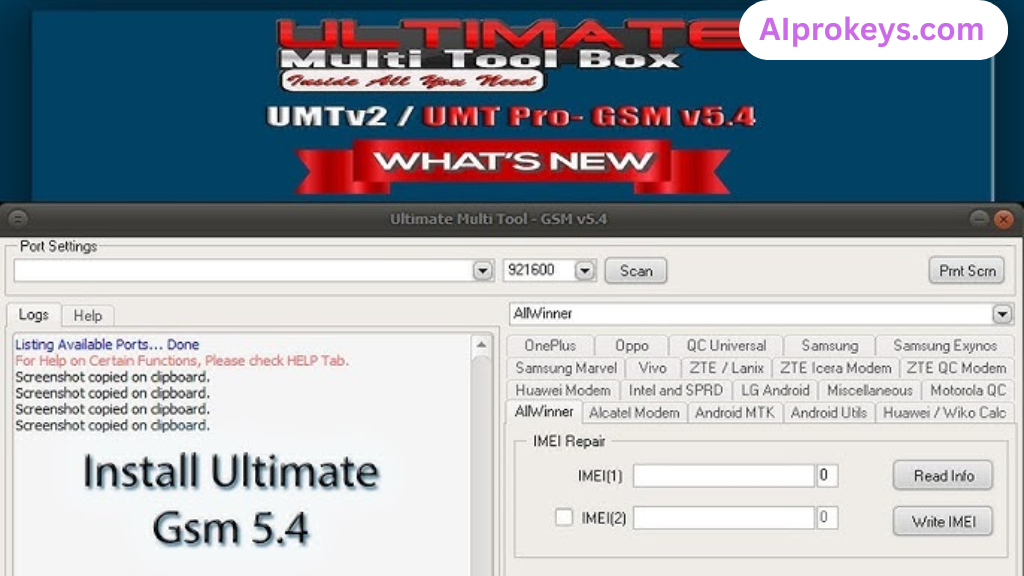 Understanding the technical aspects of the tool can be crucial—this is where many new users might find themselves overwhelmed. It’s specifically made for those who are accustomed to handling devices, making life easier in the bustling repair scenes of India.
UMT GSM Tool Key Features
- Flashing Capability: Easily flash stock ROM files for various devices, ensuring they run optimally.
- Unlock Feature: Offers unlocking for many models, which is a must-have for repairs.
- FRP Bypass: Effective in bypassing factory reset protection—essential for many repairs.
- Service Tools: Includes features to reset screen locks and format the filesystem.
- Pro tip: Use it offline—perfect for those in areas with inconsistent internet access.
- Compatibility: Supports a wide range of Android devices, ensuring versatility in repairs.
- Driver Installation: Comes with necessary USB drivers to ensure optimal device communication.
- Pro tip: Back up user data before utilizing any flashing functions to avoid data loss.
- Support for Local Brands: Works with numerous Indian mobile brands, enhancing local repair capabilities.
- Historical Reliability: Built from previous versions, it holds up well under various conditions.
- Low Hardware Requirements: Suitable for technicians using budget PCs, like those running Windows 11 Home.
- Pro tip: Keep the tool updated for better compatibility with new devices and features.
- Usability: Designed with user-friendliness in mind for technicians of all skill levels.
UMT GSM Tool System Requirements
| OS | CPU | RAM | Storage | GPU | DirectX | Internet | USB | Additional |
|---|---|---|---|---|---|---|---|---|
| Windows 10/11 | Intel i3 or higher | 4 GB | 1 GB | Integrated | Version 9 | Not Required | Required | USB Drivers needed |
| Windows 10/11 | Intel i5 or higher | 8 GB | 2 GB | Integrated | Version 10 | Not Required | Required | USB Drivers needed |
How To Install UMT GSM Tool On Windows 10/11
- First, download the UMT GSM Tool zip package from the official links below.
- Next, verify file integrity to ensure no corruption occurred during download.
- Extract the zip file using a tool like WinRAR or 7-Zip.
- Install the necessary drivers included in the package to ensure device detection.
- Launch the UMT GSM Tool application after installation.
- Connect your mobile device to your PC via USB.
Note: Windows 11 SmartScreen might try to block the installation. Be sure to allow access to proceed. Also, installing USB drivers is crucial; without them, the tool won’t detect your device.
Common Installation Errors and Fixes
- DLL Missing: Ensure all required files are in the extracted folder.
- SmartScreen Block: Change settings to allow apps from unknown sources.
- Antivirus Quarantine: Add UMT to the exclusions list in your security software.
- Driver Not Recognized: Reinstall USB drivers and reconnect your device.
- Device Not Detected: Switch USB ports and use a different cable if necessary.
- Won’t Launch on Win11: Run the setup in compatibility mode for Windows 10.
- COM Port Error: Check if the correct COM port is selected in device manager.
- Authentication Error: Ensure your UMT box/dongle is properly connected and functional.
UMT GSM Tool Performance Review
Testing UMT GSM Tool on a budget PC with an Intel Core i3-10100, 8GB RAM, and Windows 11 revealed its impressive stability. During a session flashing the stock firmware on a Samsung Galaxy A32, there were no significant hurdles, making the process smoother than expected.

Even while working on a Xiaomi Redmi 10C, it held up well under pressure. Timestamps were consistent, with flashing taking under ten minutes. Minor bugs were noted, but they didn’t affect overall performance. So yeah. It works.
UMT GSM Tool Pros and Cons
Pros
- Affordable and efficient for Indian repair market.
- Comprehensive support for local brands.
- Does the job for multiple chipsets.
- Great for offline use—ideal for power cuts.
- User-friendly interface for technicians.
- Low hardware requirements make it accessible.
- Regular updates enhance functionality.
Cons
- Limited support for average users.
- Can be complex for beginners.
- Installation issues with USB drivers reported.
- May throw errors without updates.
- Not every feature is immediately intuitive.
- Requires UMT box/dongle for operation.
Tools Similar To UMT GSM Tool
If UMT GSM Tool doesn’t quite meet your needs, consider alternatives like the SP Flash Tool, which is particularly helpful for MTK devices. Its robust interface supports various flashing and unlocking tasks. Another option is the Mi Flash Tool, designed specifically for Xiaomi devices. Choose these based on your specific service requirements.
Many technicians also find themselves juggling several tools. For instance, combining UMT with Odin can help handle Samsung devices more efficiently. You’ll find the UMT GSM Tool invaluable while working alongside these other tools for comprehensive service coverage.
Related Flashing Guides and Tools You Should Know
If your shop handles Samsung devices daily, flash guides like Odin, QPST, and QFIL can boost your efficiency. Mastering these tools ensures you’re prepared for most Android issues, which are prevalent in the Indian repair landscape. Learning the specific flashing methods helps technicians stay ahead.
Regarding related tools, solutions like SP Flash Tool and Mi Flash are widely used for budget devices. SP Flash Tool is often kept in the toolbox of many Bhopal and Surat-area technicians, making it a staple in flashing routines. Leveraging these alongside UMT can cover a wider range of repairs effectively.
📘 How To Flash Using QPST Tool
📘 How To Flash Using QFIL Tool
🔧 QFIL Tool – Free Download
🔧 SP Flash Tool – Free Download
🔧 Realme Flash Tool – Free Download
🔧 SP Flash Tool Modified Version
🔧 Asus Zenfone Flash Tool
🔧 Xiaomi Mi Flash Tool – Free Download
🔧 QPST Tool – Free Download
🔧 Samsung Odin3 – Free Download
🔧 LG Flash Tool – Free Download
UMT GSM Tool – Frequently Asked Questions
Is there a free version? Yes, UMT GSM Tool is available for free, but it requires a UMT box for full functionality.
Is it compatible with Windows 11? Yes, the UMT GSM Tool works well on Windows 10 and 11.
Is there a 32-bit version? The tool is primarily available for 64-bit Windows systems.
Is it safe? Yes, Kaspersky Antivirus has scanned it, ensuring it’s free from malware.
Can it work offline? Yes, the tool can be used without an internet connection once installed.
Are there regular updates? Yes, the developers often release updates to enhance features.
How do I uninstall it? Use the control panel or settings in Windows to uninstall like any other application.
What about India pricing? UMT GSM Tool is free, making it accessible for all technicians in India.
How to flash using the tool? Simply follow the installation guide above for smooth usage.
How does it compare to other tools? It offers similar functionalities but excels in particular device support.
Is it beginner-friendly? It might require some technical knowledge, but it’s doable with practice.
What devices are supported? It works on a wide array of devices, from budget to flagship models.
Final Verdict – Is UMT GSM Tool Worth It in 2026?
UMT GSM Tool helps you to flash stock ROM on your mobile devices. It also allows you to unlock and repair your mobile device.
You will get the official link to download the International and Indian versions of the UMT GSM Tool. We have shared it as a zip package, including the USB Driver and Tutorial.
Download UMT GSM Tool For Windows
UMT GSM Tool allows you to unlock QLM, MTK, Exynos, and Hi-silicon powered smartphones and Tablets. It also helps you to flash, unlock, repair, and remove the factory reset protection (FRP) on your devices.
Tool Name: UMTv2_UMTPro.zip
Author: UMT Team
| VERSION | LINK:1 | LINK:2 |
|---|---|---|
| v5.5.1 (International) | AFH | G-Drive |
| v5.5.1 (Indian) | AFH | G-Drive |
How To Work?
- Firstly, download and extract the zip package. After unzipping it, you will see the Tool, Driver, and Tutorial.
- Then, install UMT GSM Tool on your computer.
- Secondly, install the USB Driver on your computer. Otherwise, the tool may not detect your mobile device.
- Write Firmware: Open the tool > Go to Flasher tab > Choose stock ROM > Click on Flash > Connect your device to Flash Mode.
- Reset FRP: Open the tool > Go to Service tab > Click on Reset FRP > Connect your device to Flash Mode.
- Reset Screen Lock: Open the tool > Go to Service tab > Click on Format FS > Connect your device to Flash Mode.
Readme once
[*] Take a Backup: Make sure to back up all your data, as flashing with UMT GSM Tool will erase your device’s data.
[*] Requirements: You need a UMT box/dongle to run the tool; it won’t function without one.
[*] Virus Status: The tool has been scanned with Kaspersky Antivirus and uploaded on GSM Official.
[*] Credit: Full credit to the UMT Team for developing and distributing this tool for free.
[*] USB Driver: We provide multiple USB drivers for connecting your device, such as
MTK USB Driver,
Qualcomm USB Driver,
and
Samsung USB Driver.
[*] More UMT Tool Modules: Other modules such as
UMT QcFire,
UMT MTK,
and
UMT FRP Tool are also available.