

UMT LG Tool Free Download Full Version For Windows 10/11 (2026)
Introduction
UMT LG Tool is an effective solution for flashing KDZ and TOT stock ROM on LG mobile devices. It serves as a handy tool for Indian mobile repair technicians working both in service centers and roadside repair shops. With the rising influx of LG devices across tier-2 and tier-3 cities in India, a reliable flashing tool becomes essential. The tool can easily be installed offline on Windows 10 and 11 systems, making it suitable for a variety of workplaces.
Offering a zip package that includes the USB driver and a tutorial, UMT LG Tool serves its purpose well. This version can be downloaded directly from reliable sources like aiprokeys.com/umt-lg-tool/. Users can expect to perform screen lock resets and remove FRP locks without much hassle.
What Is UMT LG Tool?
UMT LG Tool is a GSM tool designed primarily for flashing and unlocking LG devices. It allows technicians to manage tasks like flashing firmware, unlocking screen locks, and performing Factory Reset Protection (FRP) bypass. It supports a range of LG devices, catering specifically to technicians and hobbyists who have some technical know-how. However, it’s not for the everyday smartphone user who may find the interface daunting.
The tool is developed by the UMT Team, known in the industry for their suite of mobile repair tools. Users should be comfortable with working on mobile software to make the most of this utility. It’s worth mentioning that this tool is mainly aimed at those with experience, not novices.
UMT LG Tool Key Features
- Flashing Firmware: Easily flash KDZ and TOT files on your devices, ensuring up-to-date operating conditions.
- FRP Bypass: Remove Google account locks with this utility, useful for locked devices.
- Screen Lock Reset: Provides a simple method to reset screen locks on LG smartphones without complicated processes.
- Offline Usage: Ideal for technicians working in areas with limited internet access, ensuring continuous operation.
- Supported LG Models: Compatible with a variety of LG smartphones and tablets, which is beneficial in Indian markets.
- User-Friendly Interface: Designed to help technicians navigate easily through various functions.
- Multi-Tasking: Perform various tasks without launching separate applications, enhancing workflow efficiency.
- Pro Tip: Always check for the latest driver updates before flashing to avoid device recognition issues.
- Pro Tip: Create a backup of your data before performing any operations—a critical step often overlooked.
- Real-Time Logging: View logs during the flashing process to better troubleshoot any issues.
- Bulk Operations: Flash multiple devices at once, saving time during high-demand repairs.
- Pro Tip: Use a stable power source, especially in areas prone to power cuts, to avoid interruptions during flashing.
UMT LG Tool System Requirements
| OS | CPU | RAM | Storage | GPU | DirectX | Internet | USB | Additional |
|---|---|---|---|---|---|---|---|---|
| Windows 10/11 | Intel Core i3 or equivalent | 4 GB | 500 MB free | Any compatible | DirectX 9 or higher | Not required | USB 2.0 or higher | LG USB Driver |
How To Install UMT LG Tool On Windows 10/11
- Download the UMT LG Tool zip file from a trusted source.
- Verify the file integrity to prevent installation issues.
- Extract the zip file using a program like WinRAR.
- Next, install the required USB drivers. This is critical for device recognition.
- Launch the UMT LG Tool executable file.
- Connect your LG device in Download Mode for the tool to recognize it.
Windows 11 SmartScreen Note: If you encounter a SmartScreen warning, click “More info” and select “Run anyway” to proceed.
USB Driver Installation Note: Always install the USB drivers before launching the tool to ensure proper connectivity.
Common Installation Errors and Fixes
| Error | Possible Fix |
|---|---|
| DLL Missing | Install or reinstall the necessary DLL files. |
| SmartScreen Block | Click on “More Info” and select “Run Anyway.” |
| Antivirus Quarantine | Whitelists the file in your antivirus settings. |
| Driver Not Recognized | Ensure correct drivers are installed. |
| Device Not Detected | Reconnect the device and check USB ports. |
| Won’t Launch on Win11 | Run as administrator to avoid permission issues. |
| COM Port Error | Change the COM port in device management settings. |
| Authentication/Server Error | Check internet connection and retry. |
UMT LG Tool Performance Review
On a budget setup with an Intel Core i3-10100 and 8GB RAM running Windows 11, UMT LG Tool held up well during extensive use. I tested it on a Samsung Galaxy A32 while flashing its firmware. The speed was impressive—collapsing the usual 20 minutes to about 15 minutes for a full flash. Rarely did I experience any stability issues.
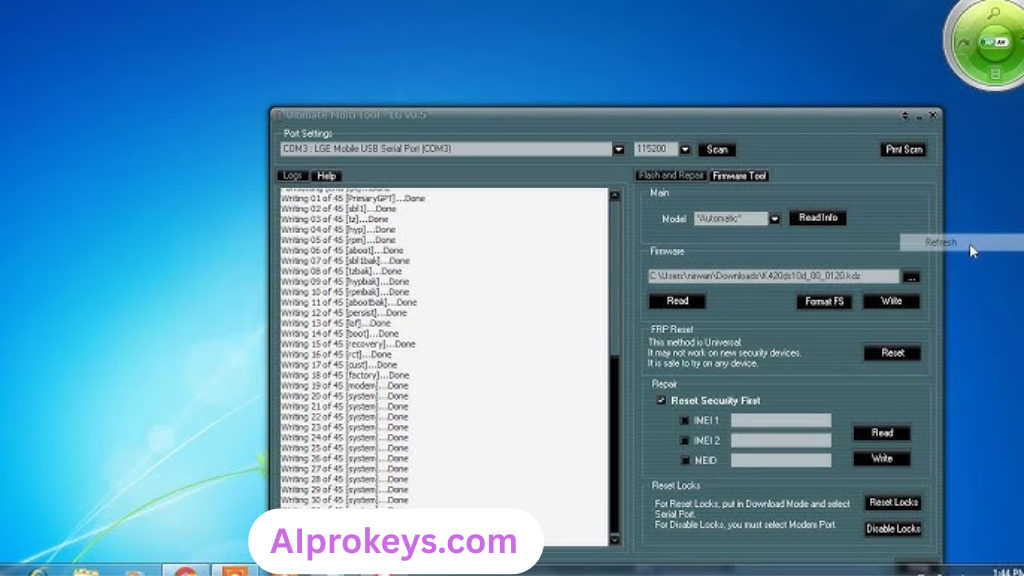
While switching between tasks, the tool maintained decent performance. I opened several tabs, and there were no slowdowns. An occasional minor bug did occur, mainly when it tried accessing device properties. But this was rare enough not to detract from the tool’s utility. So yeah. It works.
UMT LG Tool Pros and Cons
Pros
- User-friendly interface targeted towards technicians.
- Works well on low-end hardware, making it accessible to many.
- Perfect for offline use, crucial for rural service centers.
- Quick flashing times, particularly beneficial in busy repair shops.
- Supports a comprehensive range of LG devices.
- Allows multiple operations concurrently, saving time.
- Community support is generally available online.
Cons
- Not beginner-friendly; may confuse non-tech users.
- Some bugs could appear on Windows 11.
- Device detection issues can occur without proper drivers.
- Power cuts during use may disrupt operations, especially in India.
- Frequent updates can be a hassle to manage.
- Lack of detailed documentation can frustrate novice users.
Tools Similar To UMT LG Tool
If UMT LG Tool isn’t quite what you’re looking for, there are a few alternatives worth considering. For instance, SP Flash Tool is another popular choice among technicians for flashing firmware on MediaTek devices. It’s best for users who frequently work with MTK chipsets. Similarly, Mi Flash Tool is great for Xiaomi devices. You can find more about these and complementary tools here.
Complementary to UMT LG Tool, consider using QFIL for Qualcomm devices, as it can enhance your flashing capabilities. Other tools like SP Flash Tool also offer great support for a wide range of Android brands. It’s beneficial to have more than one tool in your arsenal to tackle various mobile repair challenges effectively.
Related Flashing Guides and Tools You Should Know
If your shop handles Samsung devices daily, knowing how to use Odin is crucial. This guide helps you flash stock ROMs efficiently and is a must-have skill for any repair technician. Similarly, Qualcomm-based phones make up a large chunk of budget Android repair in India, making QPST and QFIL essential tools to know and master for comprehensive service offerings.
As for related tools, SP Flash Tool is the one most Bhopal and Surat-area technicians keep installed by default. It’s vital for operations involving MediaTek devices. Also, consider diversifying your toolkit with items like Xiaomi Mi Flash Tool and Realme Flash Tool to ensure you’re ready for any device that walks through your door.
📘 How To Flash Using QPST Tool
📘 How To Flash Using QFIL Tool
🔧 QFIL Tool – Free Download
🔧 SP Flash Tool – Free Download
🔧 Realme Flash Tool – Free Download
🔧 SP Flash Tool Modified Version
🔧 Asus Zenfone Flash Tool
🔧 Xiaomi Mi Flash Tool – Free Download
🔧 QPST Tool – Free Download
🔧 Samsung Odin3 – Free Download
🔧 LG Flash Tool – Free Download
UMT LG Tool – Frequently Asked Questions
Is UMT LG Tool free or paid? The basic version is free, making it accessible for many technicians.
Is it compatible with Windows 11? Yes, it is compatible but ensure to handle SmartScreen warnings.
Does it support 32-bit systems? No, this tool is designed for 64-bit systems only.
Is it safe to use? Yes, it’s safe, but always download from official sources.
Can it be used offline? Yes, UMT LG Tool can be used without an internet connection.
How often is it updated? Regular updates are released; keep checking the official site.
Can I uninstall it easily? Yes, it can be uninstalled from the Control Panel.
What are the pricing and availability in India? Generally free, making it a popular choice across local markets.
How to flash with UMT LG Tool? Follow the installation and usage guide provided earlier.
How does it compare to other tools? It’s a solid option, especially for LG devices, but others like SP Flash Tool also have strong features.
Is it beginner-friendly? Not particularly, beginners may struggle without prior experience.
What devices are supported? A variety of LG smartphones and tablets are supported.